We run joyofexploringtheworld.com with self-hosted imgproxy for on-the-fly WebP/AVIF. Originally, imgproxy read uploads from a shared Docker volume via local:// paths. After moving the media library to Cloudflare R2, imgproxy fetches HTTPS from a dedicated media subdomain only.
The cutover code was correct. Production still served broken images for hours — because we purged the wrong cache layer.
The symptom Link to heading
Datadog Error Tracking reported imgproxy errors at roughly 111 hits per 24 hours:
Source URL is not allowed: local:///wp-content/uploads/2025/06/example.jpg
Visitors saw missing or broken images on otherwise normal pages. imgproxy returned 404 with a security_error — not the invalid-signature 403 we had tuned monitors for after bot noise.
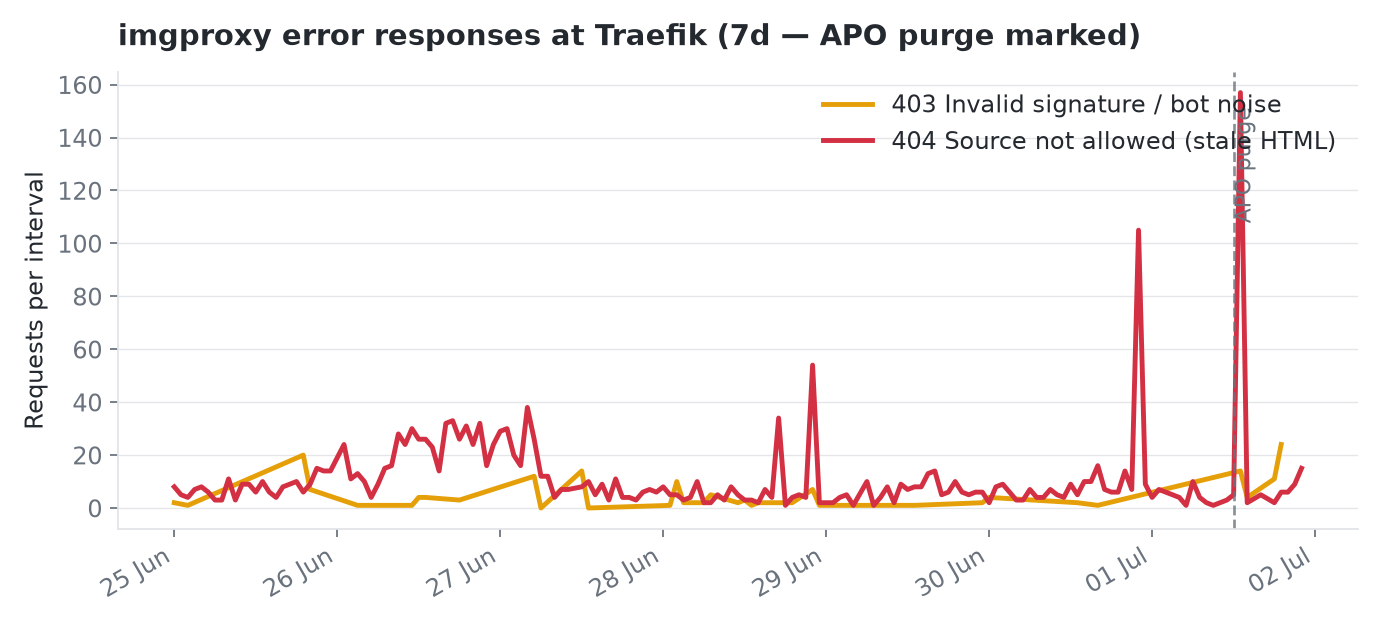
Seven-day Traefik view: 404s (red) from disallowed local:// sources persisted after origin and Redis were fixed; the dashed line marks the full Cloudflare APO purge.
What imgproxy expects now Link to heading
Post-R2, allowlisted sources are HTTPS only:
IMGPROXY_ALLOWED_SOURCES=https://media.example.com/
IMGPROXY_LOCAL_FILESYSTEM_ROOT=/data   # still mounted, but unused for public media
The mu-plugin maps legacy /wp-content/uploads/YYYY/MM/file.jpg paths to the CDN URL imgproxy should fetch:
// encode_source() — R2-offloaded and legacy upload paths → CDN HTTPS
if (preg_match('#^/wp-content/uploads/(\d{4}/\d{2}/.+)$#', $path, $matches)) {
    return 'https://' . self::media_cdn_host() . '/' . $matches[1];
}
Current git code never signs local:// for public media. A curl against origin with cache-bypass returned fresh HTML with correct https://media.example.com/… sources inside signed imgproxy URLs.
So this was not a deploy gap — mu-plugins on the edge already matched git.
The red herring: Redis and WordPress object cache Link to heading
First instinct: flush Redis object cache and WordPress transients. We did. Errors persisted.
That made sense in hindsight. Redis caches WordPress objects (posts, options, query results). It does not store the fully rendered HTML document that Cloudflare APO cached at the edge.
Root cause: stale APO HTML Link to heading
Cloudflare Automatic Platform Optimization (APO) caches full HTML pages at the edge, including inline srcset strings with signed imgproxy URLs baked in at render time.
Timeline:
- Before R2 — pages rendered with
local://imgproxy sources; APO cached that HTML. - After R2 — origin mu-plugin emitted CDN HTTPS sources; imgproxy rejected any remaining
local://requests. - Edge — APO continued serving old HTML with
local://signatures until a full APO purge.
Redis flush alone cannot fix HTML that Cloudflare already holds. imgproxy’s own image cache is a third layer — usually irrelevant when the signed URL in HTML points at a disallowed source.
| Layer | What it caches | Purge when |
|---|---|---|
| Redis object cache | WP posts, options, fragments | Config / mu-plugin changes |
| Cloudflare APO | Full HTML with signed imgproxy URLs | imgproxy or media URL rewrites |
| imgproxy | Processed raster output | Usually automatic on new valid URLs |
| Cloudflare CDN (image subdomain) | imgproxy responses | After signing key rotation |
How we verified Link to heading
- Error Tracking — grouped by imgproxy message; confirmed
local://not signature errors. - Origin bypass — request HTML with
Cache-Control: no-cacheor a cache-bypass header; confirmed new URLs were CDN-based. - Database audit — sampled post content for raw
local://or stale upload URLs; no bad URLs in DB (90 posts checked). - Full APO purge — errors dropped toward zero in the next Error Tracking window.
Monitor gap we fixed at the same time Link to heading
Our imgproxy Traefik alert filtered code:403. Security denials for disallowed sources returned 404. The real user-impact signal was invisible to the alert we had been watching. We now monitor 403 and 404 with a volume floor — see APM-first triage.
What you can do Link to heading
- After any imgproxy source change (local disk → object storage, CDN host rename, allowlist edit), plan a Cloudflare APO purge — not just Redis.
- Compare edge HTML vs origin HTML before redeploying WordPress again.
- Audit post content, but do not assume the DB is wrong — stale edge HTML can lie while the database is clean.
- Watch imgproxy 404 and
security_error, not only 403 / invalid signature. - Document cache layers in your runbook so the next migration does not repeat the purge order mistake.
If you still serve local:// today, the R2 migration path in our hybrid architecture post describes mu-plugin and env changes. This post is the operational footnote: fix the HTML cache, not just the origin.
See also: Self-hosted image optimization for WordPress with imgproxy | When Datadog Alerts Are Bots, Not Outages | Your Logs Look Fine — Start WordPress Incident Triage in APM
Built for a travel blog on a budget. This stack powers Joy of Exploring the World — curated travel itineraries, restaurant reviews, and destination guides. If you're planning your next trip, come explore with us.
All config files from this post are in the companion GitHub repo.